
Quick start
Fifteen minutes in a sandbox: govern one validation rule, bypass it for yourself only, and watch enforcement come back on its own.
1. Pick a validation rule
Choose a rule that actually blocks you during data work - for this walkthrough, assume a rule on Account that requires Phone.
2. Make it bypass-aware
Edit the rule's formula: wrap the existing logic in an AND() with the ControlLayer clause first. The token names the object the rule lives on.
AND(
    NOT(CONTAINS($Setup.itcl__vControl__c.itcl__Objects__c, ";Account;")),
    ISBLANK(Phone)
)ControlLayer is a managed package under the itcl namespace, so the prefix appears twice - once on the custom setting and once on the field: $Setup.itcl__vControl__c.itcl__Objects__c. Prefixing only the object is the most common mistake, and Salesforce rejects the formula when you save it.
Save the rule. Right now nothing changes - no window is active, so the rule enforces exactly as before. Verify by trying to save an Account without a phone number: it should still block.
3. Open a bypass window
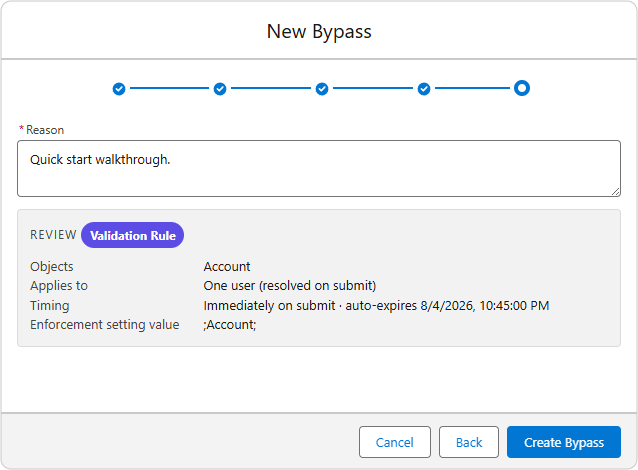
- Open the ControlLayer app and click New Bypass on the dashboard.
- Category: Validation Rule.
- Objects: Account.
- Level: User - pick yourself. The bypass will apply to you and nobody else.
- Timing: leave start blank (immediate) and set an end 30 minutes out.
- Reason: something honest, e.g. "Quick start walkthrough." Reasons are required and permanent.
- Submit. The window is created in Active status.
4. See the bypass in effect
Save an Account without a phone number - it saves. Have a colleague (or a different user) try the same: still blocked. The bypass resolves through the settings hierarchy to exactly the scope you chose.
5. Watch it end
When the end time passes, the engine expires the window (within one scheduler cycle, about five minutes) and recomputes enforcement. The record moves to Expired, and the rule blocks again - for everyone. Check the window's record page: the timeline shows the full story, and the history panel shows who did what, when.
Where to go next
- Instrument flows and triggers: Governing automations
- Set org-wide policy before rolling out: Org defaults & guardrails
- Understand every status you just saw: Window lifecycle